
Readers statistics
Each download or issue purchase is monitored so you can have an instant overview of how many readers have downloaded your publication. Detailed information can be found by clicking the icon  in corresponding publication.
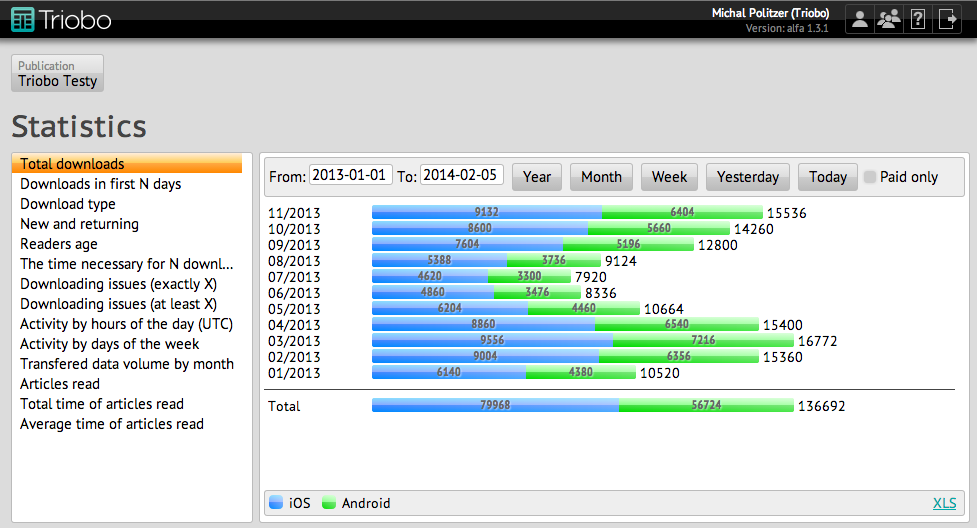
Every view of data has different filtering options. In the upper part can be then entered:
- Time period From – To – the time period for which the data is collected. You can use shorcut buttons, which set the year, month, week, yesterday and today.
- Only purchased – when you publish the charged issue, by this option you differentiate the display of all and only those issues that were purchased
- Days from the publication date – use to view the data, when the number of days from publication are important
- Number of downloads – use to view the data, when a given number of readers is important
Some views are concluded with a summary line Total. When you place your mouse cursor over each part of the chart, a supplementary information appears. The data can be stored in XLS format by clicking on the link at the bottom right.
Definition of terms:
- downloads – this is the number of unique reading devices that have downloaded a certain issues within the specified period. Each device is counted only once, even in a situation where reader had deleted and re-downloaded such publication.
- activity – this is the number of activities related to a given issue, and it also counts repetitions. Activities include downloading, buying or reading. If the reader reads or downloads the issue multiple times within a specified period, each of this activity will be counted.
- reader and deading device – are equivalent terms from statistical point of view.
Issue statistics
Section titled “Issue statistics”Issue statistics are related to number of downloads, alternatively to other activities (purchasing, reading) and are available for all issue editions.
Total issue downloads
Section titled “Total issue downloads”Displays the total number of downloads within the specified period. Data are sorted into individual channels (iOS, Android).
Issue downloads (first N days)
Section titled “Issue downloads (first N days)”Displays the number of downloads within the first N days from publication. Downloads that have occurred after a specified number of days from each publication are ignored. This can instantly compare the efficiency of each issue, regardless of when they were issued (although all of them start at the same time).
Download type
Section titled “Download type”Displays the number of downloads of each issue, depending on whether it was downloaded automatically, or manually, or whether it was a separate purchase.
New and returning
Section titled “New and returning”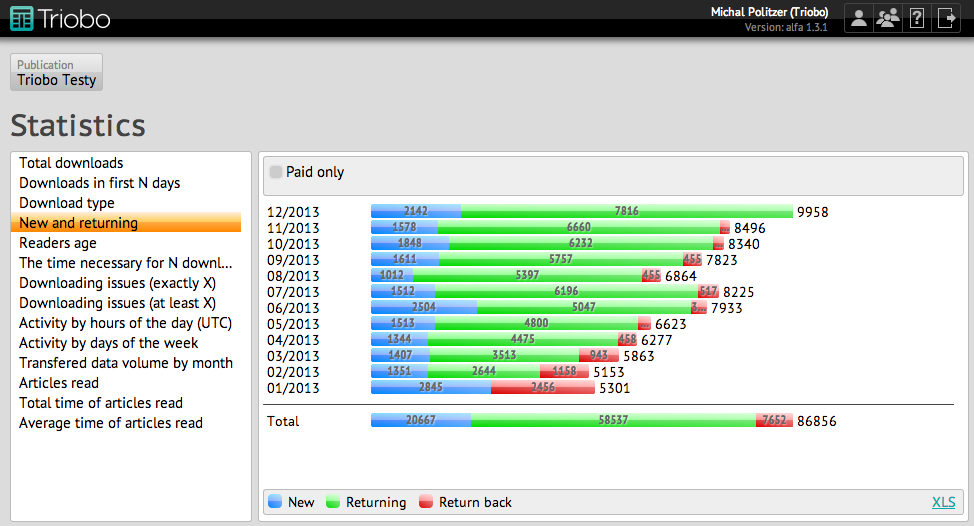 Individual downloads are divided according to whether it is newly downloaded issue (new reader) from given device, or whether older issue was previously downloaded from this device (returning reader), or whether newer issue was previously downloaded from this device (reader returning back to Old numbers).
Readers age
Section titled “Readers age”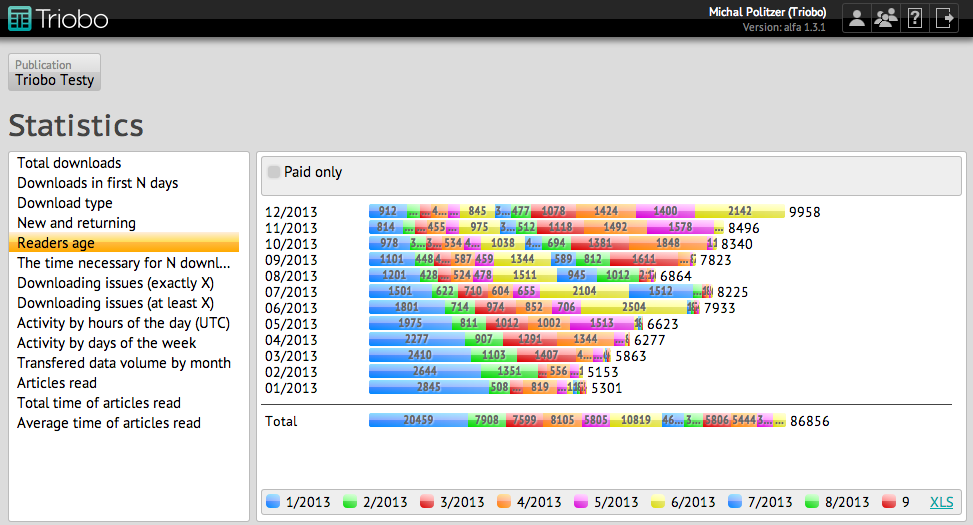 Each reading device is paired with a month when particular issue was uploaded to it for the first time. According to this classification number of downloads are essentially displayed for all issues. For example, if a user first downloaded an issue in July 2013, a blue color was assigned to it, so all issues that were downloaded will be displayed in blue.
The time necessary for N downloads
Section titled “The time necessary for N downloads”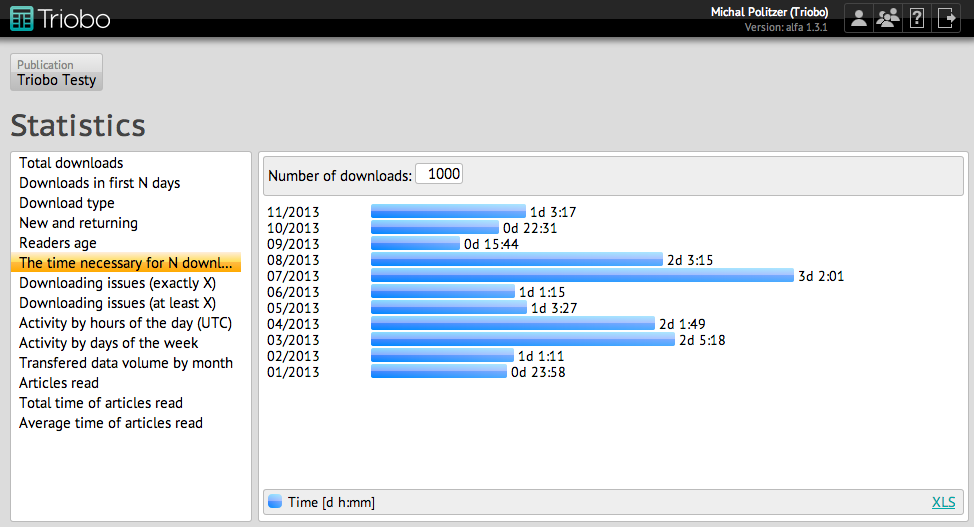 For each issue the time that had elapsed between the first and specified download is displayed. The smaller this value is, the more successful the issue is. Data is displayed in days, followed by hours and minutes.
Downloading issues (exactly X)
Section titled “Downloading issues (exactly X)”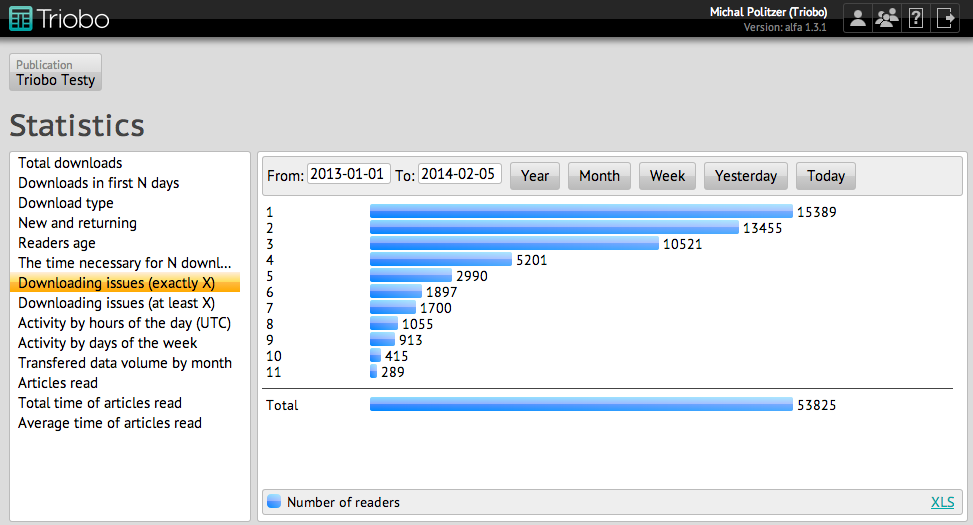 Sorts the devices from which just one, two or three issues, etc were downloaded within the specified period. For each issue the number shows the number of such devices. Each device may be found in one group. The total number shows the total number of devices that had downloaded some (or at least one) issue.
Downloading issues (at least X)
Section titled “Downloading issues (at least X)”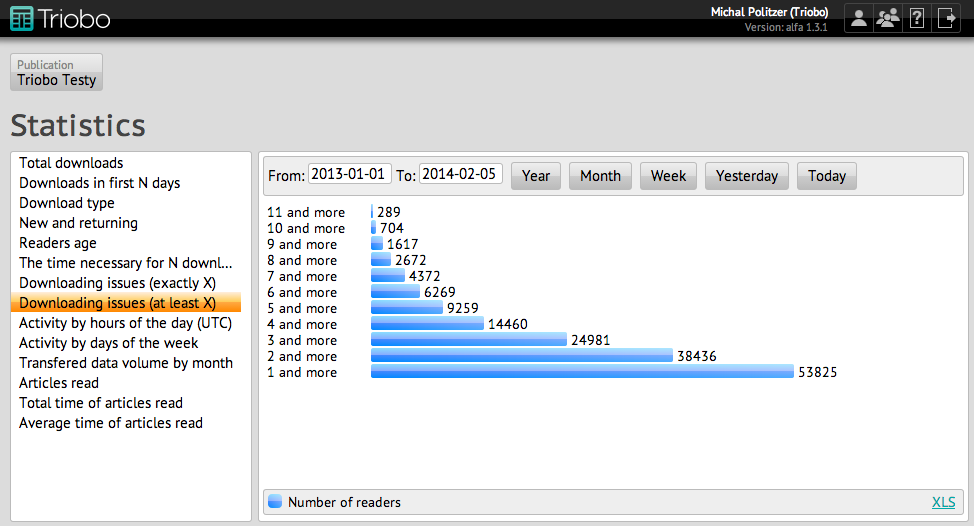 Same methods as in the previous graph, but the number of readers who have downloaded at least X (or more) issues are shown in each row. Last line thus contains the number of (different, unique) readers who have downloaded at least one (or any) issue within a specified period.
Activity by the hours of the day (UTC)
Section titled “Activity by the hours of the day (UTC)”Shows for a specified period, when readers were reading or downloading, sorterd by hours. You will find out whether your readers are more active in the morning or evening.
Activity by days of the week
Section titled “Activity by days of the week”For a specified period it shows activity distributed by days of the week.
Transfered data volume by month
Section titled “Transfered data volume by month”Quantity of downloads for each reporting month in GB. Accounting month is the calendar month shifted by as many days, as how much the beginning of the contract was shifted compared to calendar month. Example: if the customer has signed a contract on 20th May, the shift of the accounting month is 19 days, i.e. as his accounting month “September 2013” starts on the 20th September 2013 and ends on the 19th October 2013.
Article statistics
Section titled “Article statistics”Customers with Professional tariff have available also article statistics. Statistics are generated and sent out during the reading of magazine by a reader. If the reader is without an internet connection (offline reading), statistics will be sent at the earliest possible opportunity.
Articles read
Section titled “Articles read”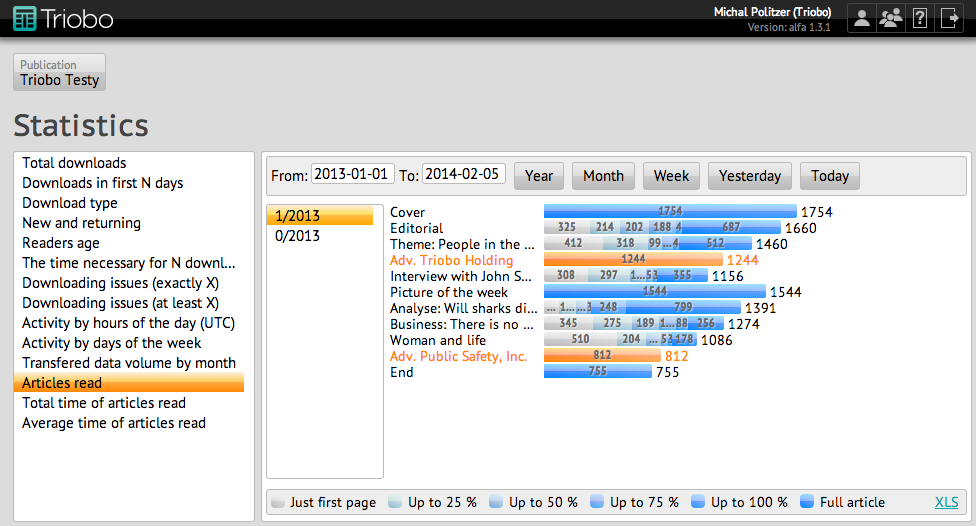 Number of readers who have viewed particular article. With rolling and multipage articles readers are divided into groups according to whether they had read only the first page, up to 25% article length, to 50% article length, to 75% article length, to 100% of the article length or entire article (i.e. rolled up to the end). Color-highlighted lines show articles marked as advertising.
Total time of articles read
Section titled “Total time of articles read”The sum of time that readers had spend on each article. If the length exceeds 30 minutes it is always counted only as 30 minutes. The total time shows the total time that readers had spent on the entire issue. Time is given in hours: minutes: seconds.
Average time of articles read
Section titled “Average time of articles read”The average time that readers had spent over individual articles. The total average time expresses how much time on average a reader had spent reading the issue. Time is given in hours: minutes: seconds.